Updated: November 23, 2026
Searching for kenoatv iptv in the United States? Before choosing a subscription, the most important step is to establish exactly which website and service you are considering. Several similarly named Kenoa TV or Kenoa IPTV websites appear in search results, and a familiar name is not enough to confirm that two sites share the same operator, plans, customer support, or terms.
This guide explains how to evaluate a KenoaTV IPTV offer responsibly: what to check about trial access, plan duration, simultaneous connections, supported devices, apps, streaming performance, customer service, billing, and content authorization. It does not assume that a channel list, advertised price, promotional claim, or streaming right applies to every site using a similar name.
If you are ready to make a decision, use the checklist below before entering payment information.
Quick answer: what should you check before buying KenoaTV IPTV?
Confirm the exact website operator, available plans and their total charges, trial eligibility, device compatibility, the number of simultaneous streams, refund conditions, and whether the content offered is properly authorized for viewers in the United States. Test the service on your own device and home network where a legitimate trial is available. Keep the seller’s written terms and your receipt.
Table of Contents
Table of Contents
What KenoaTV IPTV means
IPTV stands for Internet Protocol Television. It describes television delivered through internet-based networks instead of a traditional antenna, satellite dish, or cable-only distribution system. IPTV is a technology category, not by itself a certification that a particular service has licensed every channel it lists.
A search for kenoatv iptv might refer to a provider, a reseller, an editorial website, a trial page, or a third-party review. These are not interchangeable. If you are comparing a subscription, separate the following four elements:
- Service operator: The business responsible for the subscription, billing and support.
- Subscription access: The account or entitlement that permits specific viewing within agreed limits.
- Player application: Software that displays a compatible, authorized stream or playlist. A player is not the same thing as a subscription.
- Content rights: Permission for the provider to distribute the specific programming in the relevant territory.
For example, TiviMate’s terms expressly describe it as a media player and explain that an app purchase does not include television channels or media content. That distinction matters when a seller bundles app instructions with an IPTV subscription.
How to identify the right website
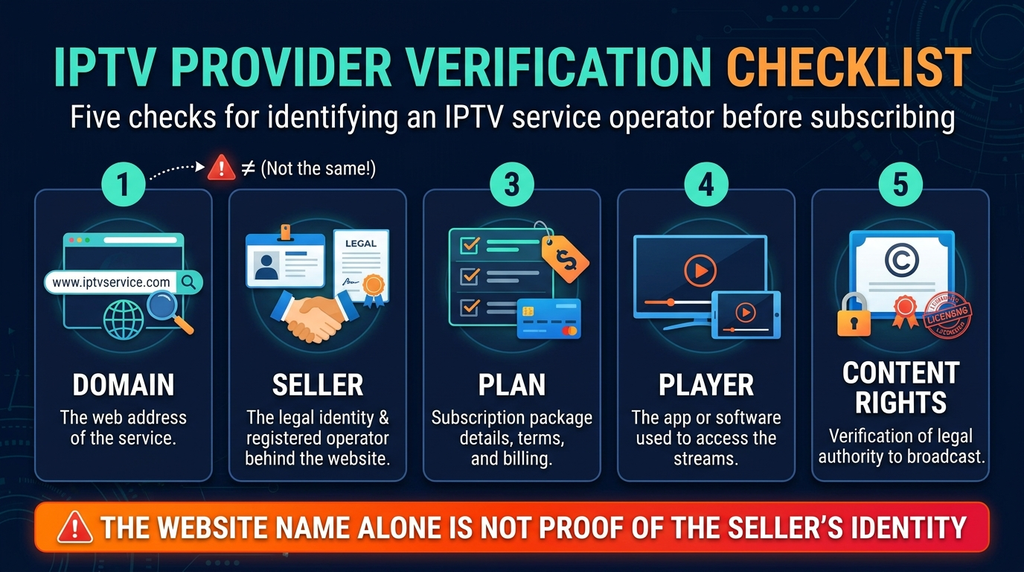
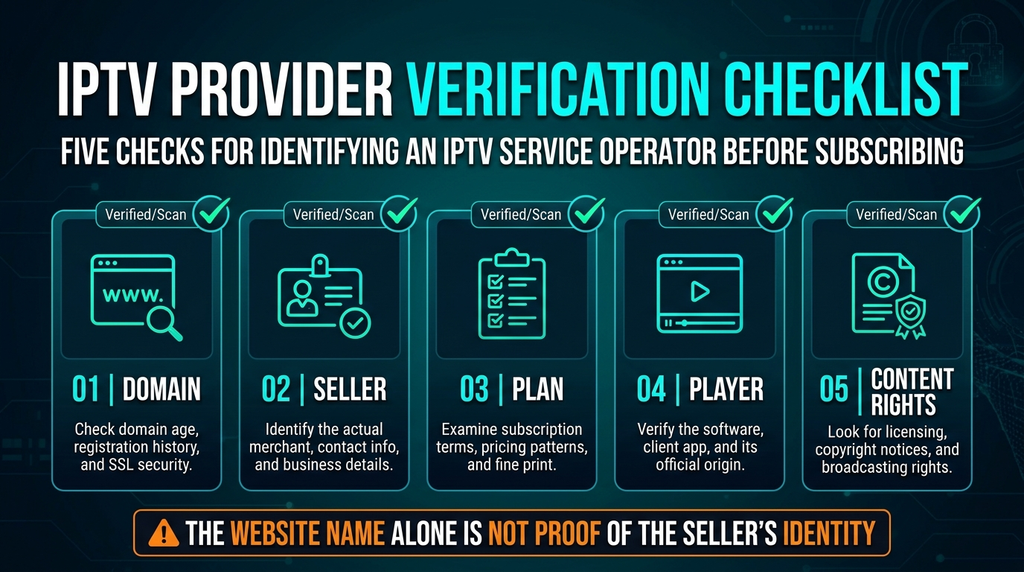
Names that look almost identical are not proof of common ownership. Searching for Kenoa TV can surface different domains, landing pages, and commercial offers. Before paying, open the website from a source you trust, inspect the domain character by character, and check whether the contact information and purchase terms consistently identify the same business.
A five-point identity check
1. Confirm the domain. Look for spelling variations, extra letters, and different domain extensions. Do not assume a third-party sales page is affiliated with another website just because both use “KenoaTV.”
2. Identify the seller. A useful purchase page should explain who processes the order, how support works, and which policies apply. An editorial blog is not automatically the seller of the service it discusses.
3. Review the current offer on that exact site. A price or free trial advertised elsewhere may belong to a completely different business. Screenshots from search results can also be outdated.
4. Check support before purchasing. Look for a consistent support channel, a written policy for account issues, and a realistic response process. Never send your password, full playlist URL, or complete payment-card details in a public message.
5. Review the full checkout. Confirm the actual amount charged, currency, billing period, renewal behavior, and any separate player-app fees before payment.
If any detail is inconsistent, do not proceed until the seller resolves it in writing. This simple verification can prevent more problems than repeatedly switching apps after purchase.
How to compare IPTV plans
A subscription comparison should begin with the total amount you will pay, not a headline monthly equivalent. A longer plan can appear cheaper per month while requiring a larger upfront payment. The right choice depends on your budget, your device configuration, and whether you have confirmed that the service meets your needs.
| Decision | What to verify | Why it matters |
|---|---|---|
| Plan duration | Exact start and end dates; whether renewal is automatic | Determines commitment and future billing |
| Total price | One-time total, taxes, extra fees, and currency | Prevents confusion with monthly equivalent prices |
| Simultaneous connections | Number of streams allowed at the same time | A household with two active TVs may need more than one stream |
| Device compatibility | App availability for your actual model and operating system | “Smart TV compatible” can be too broad |
| Trial terms | Length, eligibility, supported features, and whether payment is required | Makes a test meaningful and predictable |
| Content availability | Specific authorized channels and on-demand rights in your location | Catalog claims may not apply in every region |
| Refunds and support | Written eligibility, exclusions, and contact methods | Matters if activation or playback fails |
One connection is not the same as one installation
Many IPTV plans use a connection to mean a permitted simultaneous stream. Having an app installed on three devices does not necessarily authorize three devices to watch at once. The exact rule comes from the seller’s current terms, so do not infer it from the number of devices on which you can install the software.
A practical example: a household has a living-room Fire TV and a bedroom Android TV. If both TVs need to play at the same time, verify whether the proposed plan permits two concurrent sessions. If only one plays at a time, ask whether switching between registered devices is allowed and whether there are device or network restrictions.
Should you choose a short or long subscription?
A short term usually limits upfront financial exposure while you learn how well a service performs in daily use. A longer term may suit a provider whose licensing, service quality, policies, and customer support you have already independently checked. Neither choice eliminates the risk of changes to a catalog, app, or network connection.
Do not compare subscriptions only by claimed channel counts. A list of thousands of channels does not establish which specific channels work, which are licensed, or how reliable playback will be at peak times.
How to evaluate a free trial
A trial is useful only if it resembles the conditions under which you would actually watch. If a KenoaTV-branded website offers a trial, read that site’s terms carefully. Do not assume the trial is free, lasts a particular number of hours, includes every feature, or is available without a payment method unless its current checkout states so.
A practical trial test
First, test the main device. Try the TV, streaming stick, phone, or computer you expect to use regularly. An offer that works on a laptop but not your living-room television may not be suitable.
Next, check app availability. Confirm that a compatible, trustworthy player can be installed through the appropriate store or official developer channel. An unknown APK link from a message is not evidence of safe software.
Then, verify your important content. Check the specific authorized channel categories, language options, program guide, subtitles, and accessibility controls you actually need. Do not rely on vague catalog totals.
Finally, repeat the test under real conditions. Try regular evening viewing, navigate between permitted live and on-demand items, and note buffering, audio synchronization, and unexpected sign-outs. Make a record of the device model, app version, and time if you need support.
A trial cannot prove year-long uptime. It is one data point, not a guarantee. Also review the checkout carefully for recurring charges. The FTC’s guide to free trials and auto-renewals explains why customers should read cancellation terms and watch for unexpected charges.
Which devices and apps to check
Device support depends on the operating system, app availability, hardware capabilities, and the service’s approved playback method. Confirm the exact model rather than relying on a general “works on all devices” claim.
| Device | Where to start | Important limitation |
|---|---|---|
| Amazon Fire TV / Fire TV Stick | Search for approved apps in the Amazon Appstore | Availability varies; don’t assume an outside APK is necessary or safe |
| Google TV / Android TV | Search installed or available apps from the TV’s app interface | Apps may vary by device, country and OS version |
| Samsung Smart TV | Use the Samsung TV Apps interface | An Android phone APK cannot simply be installed as a Samsung TV app |
| LG Smart TV | Check available apps for the specific webOS model and region | Not every app appears on every model |
| Apple TV | Check the Apple TV App Store for supported players | iPhone and Apple TV app catalogs differ |
| Windows / Mac | Use a reputable player with the required, supported format | Browser access or a playlist is not always provided |
| iPhone / Android phone | Use a compatible app from a trusted distribution source | Mobile app support does not establish TV app support |
For setup details, use the manufacturers’ instructions: Google TV’s app-installation guide, Samsung’s US Smart TV app instructions, LG’s US app-installation help, and Apple’s Apple TV app guide.
TiviMate versus IPTV Smarters-style players
Both names are commonly encountered in IPTV setup discussions, but do not assume the two apps have identical features or platform support. TiviMate identifies itself as a player rather than a channel subscription, and its published app information should be consulted for its current requirements. Features, premium upgrades, and device support may change independently of any streaming-service subscription.
Whichever player you use, ask two separate questions: Is the application compatible with this device? And does the legitimate service supply an authorized, compatible login method? A “premium” upgrade inside a media player may unlock app features without purchasing any television access.
How to set up a compatible player
When you already have lawful access to content and the provider has authorized the player, the setup process typically follows this sequence:
- Confirm the device. Record its model and operating-system version, then install available updates.
- Install a trusted app. Use your device’s official app store or the app developer’s authentic distribution channel.
- Choose a supported login method. Follow the service provider’s instructions for the account type you were issued; do not assume every app supports every playlist format.
- Enter credentials privately. If your provider supplies a server address, username, password, or private playlist URL, copy these accurately and keep them out of public forums.
- Wait for permitted content to load. Initial loading can depend on app, device, guide data, and catalog size. A loading screen alone does not confirm activation.
- Check one known authorized stream. Confirm audio, playback, navigation, and any program-guide feature your plan includes.
- Store your purchase details safely. Keep the plan confirmation, seller contact information, and policy terms for support.
Avoid tutorials that instruct you to disable device protections without a clear security rationale. An unreliable download link is a reason to reconsider the installation route, not to search for random replacement APKs.
How to troubleshoot common issues
When a stream fails, isolate the component that is actually causing the problem. A login problem, an app problem, a network problem, and a service-side issue need different remedies.
| Symptom | First check | Practical next action |
|---|---|---|
| Username or password rejected | Correct service, player, and login type | Copy credentials carefully; request official account verification |
| App cannot be found | Device model, OS, region and app store | Check manufacturer-supported alternatives; do not assume an Android APK works on every TV |
| Spinning circle or buffering | General internet stability and device network | Restart app and device; try a supported connection on another network if appropriate |
| Video works on phone but not TV | TV app/version and video decoding support | Compare the supported player and update the television software |
| Program guide is blank | Provider’s guide support and player settings | Refresh guide data if the provider supports it |
| Stream stops when another TV starts | Concurrent connection allowance | Compare the active sessions against the purchased limit |
| Favorites do not appear | App-specific favorites list, profile and sync behavior | Test with one entry and contact the app developer if the feature itself fails |
| Purchased access suddenly stops | Subscription status and any service notice | Check account status and contact the actual seller |
The three-step isolation test
Start with the same authorized content on the same device and a different app only if the provider supports it. Then try an authorized stream on another supported device. Finally, check your general network with a different legitimate streaming application. If all internet video fails, investigate your network or device before blaming the IPTV account. If the same account fails only in one player, that player may be the problem.
For Google TV operating issues, Google’s troubleshooting guidance includes checks involving connectivity, updates, and device restarts. None of these fixes guarantees that an unavailable or unauthorized stream will become available.
What to include in a support request
A useful support message includes your device model, operating-system version, app name and version, the exact error text, approximate time, whether it affects one or all authorized streams, and whether it happens on more than one network. Never include your full payment-card information, password, or a private playlist URL in an insecure support message.
What to check about content rights and payments
IPTV delivery technology can be used for authorized services. The legal question is whether a particular operator has the rights it needs to distribute the programming it offers to viewers in the applicable territory. A list of sports networks, pay-TV channels, or newly released movies is not proof of permission.
Before buying, ask the seller to identify its business and explain how it is authorized to distribute the specific content included in the offer. Where rights cannot be established, choose services supplied directly by rights holders or their recognized authorized distributors. The U.S. Copyright Office’s copyright guidance explains the broader importance of permission for copyrighted works; it should not be treated as a determination about any one IPTV provider.
Billing and refund questions to ask
- Is the plan billed once for a fixed period, or does it renew automatically?
- What is the final amount in US dollars, including any fees or taxes shown at checkout?
- Are player-app fees separate from the streaming subscription?
- What circumstances qualify for a refund, and how is a request submitted?
- How will you receive an invoice, activation notice, and support contact details?
- If the service changes its catalog or stops working, what remedy—if any—is written into the policy?
Keep copies of the terms displayed when you pay. Where a seller cannot explain the payment flow or its content authorization, an attractive discount is not a reason to proceed.
Frequently asked questions
Is KenoaTV IPTV a streaming app or a subscription?
The phrase appears in searches for more than one website or offer. Confirm the actual seller and product. An IPTV player is software, while a subscription is a separate access arrangement, and the two may have different costs and support contacts.
Is there a KenoaTV IPTV free trial in the USA?
Some similarly named websites advertise trials, but their terms are not interchangeable. Verify the current trial length, eligibility, payment requirements, included features, and territorial availability directly with the specific operator you intend to use.
How much does KenoaTV IPTV cost?
There is no single verified price that can safely be assigned to every website using a similar name. Check the exact domain’s current checkout, total charges, billing period, number of concurrent connections, and written policies.
Can I watch IPTV on a Fire TV Stick?
Fire TV devices can run compatible applications available for their platform. Whether a particular IPTV offer works depends on the installed player, the provider’s approved access method, the device, and the rights to the content. Check supported apps before paying.
Does TiviMate Premium include television channels?
No. TiviMate’s published terms say its purchases unlock application features, not channels or streaming content. A separate, properly authorized content source is required.
Can I use one IPTV subscription on two TVs at once?
Only if the seller’s terms and your purchased allowance permit two simultaneous streams. Being able to install an app on two TVs does not establish that both can play at the same time.
Will a VPN guarantee that buffering stops?
No. Buffering can result from Wi-Fi performance, device limitations, application behavior, network congestion, or source availability. A VPN can also add overhead. Diagnose the connection and player first; do not rely on blanket performance promises.
Is every IPTV service legal in the United States?
No blanket conclusion is appropriate. IPTV is a delivery technology; individual content distribution and access depend on the relevant rights and law. Ask for credible evidence of authorization and use legitimate distributors when in doubt.
Your next step
Before deciding on a KenoaTV IPTV subscription, write down the exact seller domain, the full plan price, the connection limit, the supported player for your device, the trial rules, and the content-rights and refund information. If you cannot verify those six items, pause the purchase and seek clarification from the operator.
A good decision is not simply finding the largest advertised catalog or the lowest monthly equivalent. It is choosing a clearly identified, authorized service whose actual terms and device support match how you plan to watch.